




bred94
INpactien
-
Inscription
-
Dernière visite
Tout ce qui a été posté par bred94
-
 Yep 🙂 Cool que la "H8D" soit une bonne ram ! 👍 J'ai dit à mon frère qu'il pouvait essayer de monter des paliers de fréquences ram dans le bios jusqu'à trouver le maximum stable mais bon il n'aime pas trop toucher à cela^^ 🤞
-
Salut De retour de chez mon frère, j'ai eu accès au pc. J'ai donc choisi la méthode simple à savoir charger le profil XMP des barrettes (à 3600MHz) puis diminuer manuellement la fréquence à 3200MHz. On verra dans les prochains jours si le pc est stable après que mon frère l'ait un peu utilisé 🙏 Je joins une capture d'écran de thaiphoon des barrettes en question

-
Merci de ton retour ashlol 👌 je n'avais pas compris non plus sa remarque sur la fréquence mémoire dite trop faible^^ Hum.. je ne sais pas trop ce qu'il en est, sur les 3/4 config AM4 que j'ai montées, après application du profil XMP, le tRC est toujours réglé quelque part entre 80 et 90 alors que CPU-Z donne par exemple 52 ou 58 selon le kit^^ ceci avec mes cartes mères asus, msi ou asrock. J'ai tendance à simplement consulter cpu-z pour vérifier les 4 timings principaux du profil XMP puis le tRC, mais je ne sais pas du tout si d'autres valeurs pourraient être incorrectement appliquées par défaut. Merci pour le Guide oc Ram 👍
-
Hello, Je n'ai pas encore pu aller chez mon frangin pour régler sa ram mais entre temps j'ai contacté le support asrock pour glaner quelques informations et je joins les réponses obtenues par la personne qui m'a répondu très sympathiquement. Il m'a conseillé en méthode simple de charger le profil XMP puis de descendre la fréquence autour de 3200/3266Mhz pour faire probablement fonctionner le kit sans soucis. De désactiver le gear down mode si activé dans le bios. Et enfin d'utiliser thaiphoon burner & dram calculator au besoin d'optimiser, ou en cas de souci persistant. Je vous mets notre discussion : Hello, It have a problem to safely activate XMP profiles on my computer with Asrock B450M Steel legend with different memory kit I have tried.. I already tried 3 different memory kit that work well on my other AM4 computer but this one seems to give crash every time I load XMP profile in the bios. Here is the other kit I already tried without success before the actual G.Skill 3600C16 : 2x8Go Ballistix Sport LT BLS2K8G4D30AESBK (3000 CL15) 2x8Go Corsair vengeance CMR16GX4M2C3000C15W (3000 CL15) Activate XMP produce crash.. so now the memory is left in auto mode @2133Mhz and this is not optimised very well. Have you any suggestions to make the XMP is more stable. Maybe check the soc voltage or dram voltage to add a little more power ? Thanks -- Asrock : Dear customer, The memory controller is NOT on the board, but is integrated in the CPU, and runs optimal at 3200MHz with 2 modules https://www.amd.com/en/product/8456 3 things 1. It could very well be that your CPU's memory controller is not capable to go above 3200MHz 3600 is maybe too much, and 3000 is actually too low. 2. XMP is an Intel standard, and is a set of values, that is only SUPPOSED to work, it is not guaranteed, and far from optimal 3. There is no difference in overall system performance between 3200MHz and 3600MHz, that is a myth. It is caused by the fact that memory benchmarks are synthetic, but your CPU, will not go any faster Before changing memory settings, it's best to always, reset the BIOS (UEFI) to default settings with f9, and save with f10 Please look at the specifications on the website F4-3600C16D-32GTZNC - Specification - G.SKILL International Enterprise Co., Ltd. (gskill.com) The SPD speed is 2133MHz, and that is what automatically is used, XMP always has to be selected manually, because it's not said, it will work. Here is what you can try. 1. Reset the BIOS with f9, and save with f10 2. Select the XMP profile, but before saving with f10, set the memory speed to 3200MHz, or just above like 3266MHz, and save with f10 Use slots A2-B2 Usually that works I cannot tell which voltages to set, it differs with each CPU. Please let me know the outcome ---- Thank's for your answer. I though I would try this tutorial https://pausehardware.com/tuto-optimisation-de-la-ram-pour-ryzen/ with the use of thaiphoon burner & dram calculator to find best frequency and timings but your advice is nice I think I will try to activate XMP and lower the frequency. This computer is in my brother's house so I have not the hand on it but I will try what you suggest. ---- I can give you some hints. First of all, use a FAT formatted USB stick, and go into OC Tweaker and the timing settings. Press f12 to create a BIOS screenshot on the USB stick, scroll one page down, and press f12 again, for the next page, and do this a third time for the rest of the settings. Print these 3 pages. Checkout the Memory XMP info screenshot I attached, you see the primary and the secondary timing, and also the names above You will find the values tRFC , tRFC2 and tRFC4 as separate values. From the XMP profile, only the primary values are used, secondary values, always stay on auto, and can sometimes influence behavior. There is one setting called Gear down mode, what this does is that when the latency timing is odd, so 11-13-15-17, it will change it into an even value, so 10-12-14-16. Sometimes it's better to disable Gear down mode. With Thaipoon burner you can view the content of the SPD chip, and can also export it into a HTML file. With Ryzen DRAM calculator, you can import this HTML file, and it will calculate better settings, and here you can also make a screenshot and print it. And then the prints with all the names and settings becomes useful. This is how it should be done, but sometimes you just cannot get it to work, it happened to me, because the memory was simply no good. But first try to reset, and save, then change values and set the DRAM speed manually, there is a good chance, it will work fine at 3200 or 3266. I hope you get it t o work. --- Thank's a lot for your time and advice. I think I will try the fastest method in a first time, to activate XMP then lower the frequency. I have noticed on my AM4 computers that even the tRC is not set at the right value when XMP is activated, the timing tRC is set to .. 85 or so, whereas it shoud be at 16-16-16-36-52 as described in XMP profile (of the samsung BDie memory in my first desktop for example)^^ You mentionned that the secondary timings are not really well configured automatically, so do you think it's good to set them to their right value after having the XMP enabled ? You mentionned also to take screenshot of the timing values in the bios, should I do that to inform thaiphoon ? If so, shoud the XMP profile be active when I take these timings values ? --- The reason I have these screenshots, is that I also have been struggling with my TRX40 Taichi and XMP, and with the 3200 Corsair, and the 3600MHz Corsair( see snapshot) I couldn't get it to work, so I tested on the TRX40 Creator, and with 3 different CPU's, here in our office, same problem. Of course you can also make a screenshot from Thaipoon burner, but it's not required. There are 2 ways to use the Ryzen DRAM Calculator 1. Make a screenshot from Thaipoon burner, and fill in all the values, brand of chip, which die, timing etc, manually It's a lot of work, and also gives no guarantees 2. Use the HTML export file you created in Thaipoon, and import it in Ryzen DRAM calculator It will fill in all the values for you, that's the easiest, and probably best way But XMP really sucks, it is just a SHOULD WORK profile tRC belongs to the secondary timing, that is why the value is wrong. The screenshots (see Load XMP screenshots) can make life easier, and by the way, the value tCCD_L, doesn't exist, also the value 0 is not correct, but I have no idea how to do this, since nothing really worked. Now I'm using Patriot Viper 3600MHz running at 3266MHz, and I have invested so much time and effort to get it working, I simply gave up, and used a setting that is working with the XMP profile and a different DRAM Speed. I attached a screenshot of my system. I really hope you get it working with XMP at 3200 or just above, if that works, leave it like that. And remember, if you find the gear down mode setting, it can help to disable. ----- Thank's for the informations. I heard somewhere that corsair memory have not the best compatibility with ryzen platform, I don't know f it may be true although. Here at home I have three AM4 computers that seems to work well with 3600C16 memory, maybe I had some luck in the choice of memory stick^^ 1. MSI B550M Mortar wifi + R7 5800X + 2x16 G.Skill 3600C16 BDie (16-16-16-36-52) 2. Asus prime X370 pro + R5 3600 + 2x8 G.Skill 3600C16 BDie (16-16-36-52) 3. Asus Strix B350i-gaming + R5 3600X + 2x8 Crucial 3600C16 (16-18-18-38-58) For now, desktop 2 & 3 seems to works well although I do not use them very much^^ for the first desktop the memory controller in the ryzen 5800X is better so it is usual. ----- The secret with memory is: https://www.crucial.com/support/articles-faq-memory/truth-about-memory-manufacturers Besides Crucial and Samsung, the rest are assemblers, who buy PCB's and chips from Samsung, Micron, Hynix, Nanya, Elpida, Spectek and others. And there is a huge shortage in DDR4 and DDR5 memory chips, so these assemblers buy anything they can lay their hands on, and as long as the speed, Primary latency timing (not the secondary timing) and voltage stay the same, they keep using the same partnumber, over and over again. It can happen that in 1 day, they produce memory containing 1GB chips from brand A, and the next batch has 2GB chips from another brand, that is the reason why we mention, which chips are on the memory we tested. But it’s the combination of the memory controller inside the CPU, and the memory modules. I attached 2x 2 screenshots, both were from 2 memory kits that were bought in one purchase, same partnumber for each kit, but not working, because each kit contains a diffent brand of chips We only have a memory QVL, because the other manufacturers, also have one, but basically any QVL is useless. --- Thank's for the article linked and the explanations, I understand better the proccess of DRAM manufacturing. Sad that assemblers can change memory chips like that, without transparency.. I Will tell you if my brother's computer get stable with memory at 3200Mhz after next time I go visit him. --- I think there is a lot of misconception, when it comes to memory, and overclocking profiles. Professional overclockers for instance, buy multiple CPU's of the same type, to find the "Golden Sample" that allows them to overclock. If these memory assemblers were honest and would use different partnumbers each time, they produce a new batch, a memory QVL would be useful, but now they use the same partnumbers, hundreds of times, each with different chips, and they simply use version or revision numbers, but that you don't see, its also not mentioned on their website Gskill shows on which boards this memory has been tested F4-3600C16D-32GTZNC - QVL - G.SKILL International Enterprise Co., Ltd. (gskill.com) Corsair doesn't even have a compatibility list anymore, but even when, it would be useless. I think the majority of the supports tickets, is about memory, and often the motherboard is blamed, so many people still believe that such a thing as a defective CPU doesn't exist. I do hope you get it fixed, and let me know. The only thing I can do, is, share my knowledge. Fin de notre discussion Autrement j'ai testé par curiosité thaiphoon et dram calculator sur mon pc1 et voici les résultats obtenus en suivant la procédure décrite dans l'article de pause hadware. On ne peut choisir l'architecture "zen 3" ou le chipset B550 dans les paramétrages, j'ai fais au plus proche. Certaines valeurs semblent pouvoir être pas mal diminuées (tRFC conseillé 302 VS 631) etc

-
@Rindman : Tant mieux que l'opération se soit bien passée 😁 cela aurait été dommage de faire un Fatality 😄 Sur ma carte je n'observe pas de phénomène de démarrage de la ventilation au repos 😇, la backplate métallique est ouverte en plein d'endroit et ne devrait pas provoquer de surchauffe^^ Clair que tout n'est pas optimisé au poil en sortie de boite à part peut-être sur certains modèles. Stylé d'améliorer les contacts thermiques pour libérer le potentiel de la CG
-
Hello ! Un petit partage de son que j'adore, j'ai découvert le reggae vers l'âge de 15 ans, c'était le début d'une longue romance ! 🤩 Stick Figure - Way Of Life Un groupe de reggae américain, leur dernier album "wisdom" est très réussi, je vous en recommande l'écoute si vous aimez le style Marcus Gad - Seeking A Vision Un chanteur issu de la Nouvelle Calédonie Et une petite dernière Nneka - Book of Job Bon Week End !
-
oups je souhaitais écrire que je ne me sentais "pas vraiment" de démonter la CG plutôt que "vraiment pas" lol, à mesure des modifications apportées à ma phrase ces deux mots se sont retrouvés inversés 😅 Il m'était arrivé de démonter l'une de mes CG par le passé, un modèle plus simple de mémoire^^ J'aurais un peu peur de faire une bêtise en démontant la RX maintenant par manque de pratique..
-
Salut à vous ! Merci pour ta réponse, au sujet du hot spot je me demandais justement s'il était nécessairement sur le GPU ou pas^^ Il serait peut-être profitable de changer la pâte thermique effectivement pour de meilleurs résultats, je vous avoue que je ne me sens vraiment pas de l'ouvrir actuellement car je n'ai pas beaucoup d'expérience en désossement de CG et c'est celle de mon pc principal Mais j'aime bien cette idée d'aller ouvrir un objet pour constater les points améliorables. Sympa les températures de ton côté ashlol 🙂 je viens d'essayer une charge OCCT avec la RX6600 du second pc et celle-ci affiche 21°C de différence entre les deux valeurs (GPU 46°C, Hot Spot 67°C). Peut-être que ce comportement est plus commun aux RX qu'aux RTX 🤔 @Rindman : GG, ça doit faire plaisir de constater une telle amélioration des températures après entretien ! Je n'ai pas beaucoup regardé de tests sur le net, la température hot spot sur ma RX 6700XT me parait un poil élevé (compte tenu du refroidissement du boitier et de la faible température ambiante) cependant la carte fonctionne impec oui !
-
Bonjour à tous ! Un petit sujet pour échanger autour des températures sur cette gamme RX de carte graphique AMD. Heureux possesseur d'une RX 6700XT de chez XFX (modèle Speedster Qick 319) je remarque que la différence de température entre la valeur GPU (59°C) et HOT SPOT (89°C) est très importante en charge (soit 30°C sur mon modèle), c'est n'est en rien un souci mais je pense que c'est une valeur plutôt élevée par rapport à d'autres modèles. Je joins une capture d'écran d'une session de furmark après stabilisation des températures, la carte étant dans un fractal torrent avec 2 ventilateurs ajoutés en bas qui lui souffle directement dessus, le tout à 16/17°C ambiant. Et vous, quelles sont vos températures sur vos RX 6000/ 7000 ? c'est aussi le grand écart ? 😀

-
Merci pour ces précisions 👌 ah oui en effet il y a de la marge pour une petite carte comme ça en PCIe 3.0 ^^ 😁 Je ne saurais pas dire pour les jeux gourmands car je ne connais pas bien les jeux récents mais quand je regarde les tests de cartes graphiques j'ai l'impression qu'il y en a pas mal qui demandent de grosses CG 🤓
-
Hello, je suis tombé entre temps sur un article de techpowerup qui traite du sujet des performances de la RX 6600 avec les différentes versions de port pci-express. L'écart de performance en 1440p avec cette carte utilisée sur un port PCIe 3.0 plutôt qu'un port PCIe 4.0 est négligeable, environ 1% 😄
-
Oui bizarre cette valeur^^ Sur mon pc 1 j'ai vu large niveau alim, comme elle était en promo à 90€ j'avais chopé une NZXT C850 (850 Watts) mais ce pc en R7 5800X + RX6700 XT doit consommer quoi, dans les 500W en charge je dirais à vue de nez (je n'ai pas d'appareil de mesure). Edit : euh pardon, sur le pc avec la RX 6600 c'est une alimentation 550W ^^ Aucun problème pour passer une RX 6600 avec une alim 550W, si tu pars d'une GTX 1660 super (je partais d'une GTX 1070 c'est à peu près pareil) le gain de parf. attendu est autour de 20/30% je dirais. Pas ouf comme changement mais l'ayant trouvé à 120€ en occasion je me suis laissé tenter 😜
-
Oui effectivement j'avais vu cela dans les descriptif de sites marchands, je pense que cette valeur n'est pas exacte, en pratique la consommation de la RX6600 est moins importante^^ Un test sur clubic relevait de son côté également une centaine de watts pour le modèle pulse^^ PS : en regardant sur le test de clubic je suis tombé sur les scores de unigine superposition 1080P extreme et j'ai bien environ 4400 point chez moi sur ce pc donc ça à l'air ok 😁
-
Bonjour à tous, J'ai fait l'acquisition d'une carte graphique AMD RX 6600 sur HFR que j'ai installée dans mon second pc, qui intègre une carte mère Asus prime X370-pro (port pci-ex en 3.0) Dans le logiciel GPU-Z on voit que la carte graphique supporte le PCI-Ex 4.0 8x et que le port de ma carte mère se règle en PCI-Ex 3.0 8x. Je pense que tout est normal de ce côté mais quid des performances, j'espère que je ne perd pas (trop) par rapport à une utilisation sur un port pci-ex 4.0 ? PS : par rapport à ton post ceric64, la RX6600 devrait se contenter de moins de 160W en charge, la mienne semble consommer dans les 100W d'après les relevés des logiciels, je m'attendais à plus^^
-
-
-
-
Oki merci ashlol ! ça marche je lancerai thaiphoon pour faire un point sur les puces mémoires 😊 Un commentaire sur amazon évoque des puces hynix DJR en dual rank, ce que je vérifierai
-
oki^^ Je suis tombé sur un article qui a l'air intéressant qui mentionne procODT et d'autres valeurs^^ https://www.techpowerup.com/review/amd-ryzen-memory-tweaking-overclocking-guide/ Après je me demande si le plus simple/rapide ne serait pas de baisser la fréquence ram d'un cran à 3466mhz comme indiquait ashlol. Puis-je conserver les timings du profil XMP pour une fréquence inférieure ? Je serais disposé à utiliser thaiphoon burner et amd ryzen calculator pour chercher les timings idéaux en cas de problèmes de stabilité persistants mais je pense que pour mon frère le plus rapide sera le mieux^^
-
Ce guide trouvé sur le net a l'air pas mal et décrit la procédure pour utiliser ryzen dram calculator, je pense le suivre lorsque j'aurais un peu de temps avec le pc. 🤗 https://pausehardware.com/tuto-optimisation-de-la-ram-pour-ryzen/
-
Hello Rindman, Merci pour ces infos complémentaires ! Je pense essayer ryzen dram calculator et voir ce qu'il propose comme timings^^ Autrement, je suis tombé sur un glossaire sur techpowerup qui indique ceci : - Geardown Mode - allows the DRAM device to run off its internally-generated ½ rate clock for latching on the command or address buses. ON is the default for speeds greater than DDR4-2667. However, the benefit of ON vs. OFF will vary from memory kit to memory kit. Enabling Geardown Mode will override your current command rate. Apparemment c'est activé par défaut pour les fréquences > 2666Mhz ^^ - procODT - resistance value, in ohms, that determines how a completed memory signal is terminated. Higher values can help stabilize higher data rates. Limit: None. Du coup, ne faudrait-il pas augmenter cette valeur en cas de besoin plutôt que de la diminuer ?
-
Salut Ashlol, Merci beaucoup pour ce retour détaillé. Je ne pensais pas avoir eu si peu de chance avec les ram choisies pour cette config'^^ par ailleurs cela me rassure pour la carte mère^^. Mes 3 autres config' AM4 étant toutes en 3600C16 (R5 3600 + asus prime X370 pro / R5 3600X + asus strix b350i-gaming / R7 5800X + msi B550M mortar wifi) je ne pensais pas que cela pouvait être si restrictif au niveau de la ram. Je vais suivre tes conseils et relâcher un peu le 1er timing en passant de c16-19-19-39 à c18-19-19-39 (ou voir les timings complets 18-22-22-42 du kits g.skill en 3600C18 présent dans la qvl) et bien vérifier la tension ram à 1.35V. En second temps j'essaierai de diminuer la fréquence, une idée d'une valeur à choisir ? En autre option je peux lui reprendre le dernier kit vendu et l'orienter vers du 3200C16 peut-être. PS : je me suis mal exprimé dans mon 1er post 😅 je vous rassure je ne passe pas chez mon frère juste pour vérifier la fréquence de la ram^^😂
-
Bonjour à tous, Je viens à la pêche aux conseils car je rencontre un souci avec une tour que j'ai montée pour mon frère. La tour semble bien fonctionner avec les réglages de la ram en auto (2133Mhz) mais lorsque les profils XMP sont activés ils ne tiennent pas, à chaque fois que je me rends chez lui pour vérifier la fréquence ram celle-ci est à la fréquence minimale 2133Mhz.. La config est la suivante : Asrock B450M Steel Legend (dernier bios installé, pilotes chipset à jour) Ryzen 5 3600 GTX 1060 EVGA 750 gold SSD M2 crucial P5 2To, installation fraiche W10 Cela fait 3 kits de barrettes DDR4 différents que j'essaie d'installer dans la config sans succès.. 🤪 Hier je lui ai installé un nouveau kit de ram (qui fonctionne très bien chez moi) et XMP activé, son pc a planté 3 fois dans la soirée avec redémarrage du pc, en pleine partie de jeu (football manager) du coup je lui ai conseillé de remettre en auto les paramètres de la ram et il a pu jouer par la suite sans problèmes pour l'instant. J'ai essayé les kits suivants dans le pc, ces kits fonctionnaient bien sur mes autres config' AM4 donc je ne comprends pas pourquoi ça bloque, la CM asrock B450M Steel Legend aurait un souci ? C'est une carte mère que j'ai peu utilisée (qqs mois) cependant je n'avais aucun problème avec à l'époque. Voici les kits essayés sans succès dans cette tour mais qui fonctionnent bien ailleurs. 2x8Go Ballistix Sport LT BLS2K8G4D30AESBK (3000 CL15) : XMP ne tient pas avec 2 ou 4 barrettes 2x8Go Corsair vengeance CMR16GX4M2C3000C15W (3000 CL15) XMP ne tient pas non plus, retour à valeur mémoire minimale 2x16Go G.Skill Trident Z F4-3600C16D-32GTZNC (3600 C16) --> crashs avec XMP --> mémoire remise en auto La config est chez mon frère je n'ai pas la main dessus de suite mais si vous avez des idées je vous écoute, merci ! Bon dimanche à tous
-
Eheh ^^ C'est un bon boitier, compact pour de l'ATX, je l'utilise avec une carte mère microATX de mon côté^^ Le flux d'air est très correct de base et davantage avec ajout de ventilo en bas, même limités à 800RPM (sur 1200RPM au max) les ventilateurs de façade brassent bien l'air et le niveau sonore reste très correct en charge. Oui la carte graphique rentre à peu de chose 32.3cm vs 33cm disponible^^ 😁
-
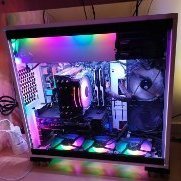
Montage fini, très satisfait du boitier ! J'ai dû recoller des petits patins en plastique que j'ai cassés en ôtant le top qui est tout en plastique. Avec l'intérieur blanc les bandes led donnent de jolis reflets