




Aller au contenu
View in the app

A better way to browse. Learn more.

Next

A full-screen app on your home screen with push notifications, badges and more.

To install this app on iOS and iPadOS
  1. Tap the Share icon in Safari
  2. Scroll the menu and tap Add to Home Screen.
  3. Tap Add in the top-right corner.
To install this app on Android
  1. Tap the 3-dot menu (⋮) in the top-right corner of the browser.
  2. Tap Add to Home screen or Install app.
  3. Confirm by tapping Install.

Gao

INpactien
  • Inscription

  • Dernière visite

Tout ce qui a été posté par Gao

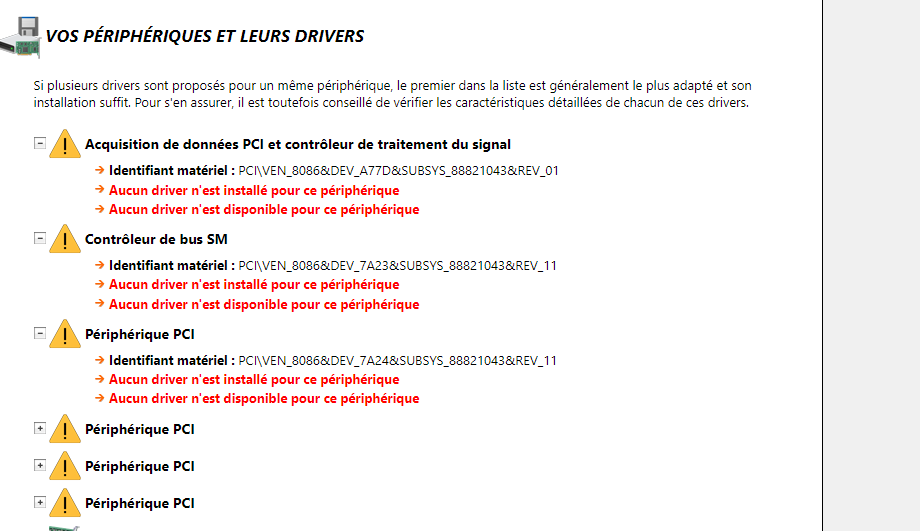
  1. Merci de ta réponse, effectivement je me suis trompé. Je profite du topic pour vous soumettre un autre soucis : je met en PJ mon gestionnaire des périphériques J'ai un nombre anormalement élevé d'erreur, et pourtant, tous mes drivers de Z790-F sont a jour, et l'utilitaire Intel me dit que tous les drivers Intel sont également à jour.... Si quelqu'un a une idée....
  2. Bonjour, J'ai installé un 13600KF qui semble plafonner a 5000mhz en pic, selon OCCT. J'ai testé sous Stress test d'occt et sur Cinebench. N'est il pas censé tourner a 5,8Ghz en mode turbo ? merci a vous :)

Configure browser push notifications

Chrome (Android)
  1. Tap the lock icon next to the address bar.
  2. Tap Permissions → Notifications.
  3. Adjust your preference.
Chrome (Desktop)
  1. Click the padlock icon in the address bar.
  2. Select Site settings.
  3. Find Notifications and adjust your preference.